


Poshmark: Shop & Sell Fashion
4.545.90K Reviews
App Specs
- Version
- 10.24.02
- Updated On
- License
- Free
- Downloads
- 10,000,000+
- Developer
- Poshmark, Inc
- Categories
- Shopping
- Platform
- Android, iOS
Screenshots

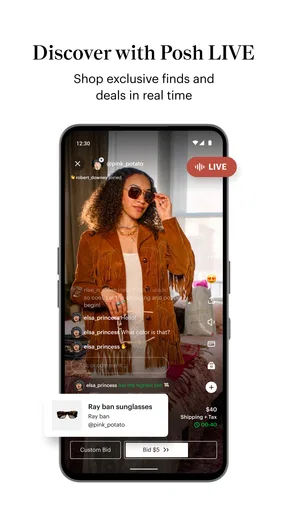


 Analysis by AppCompare
I find that Poshmark - Sell & Shop Online works best when I treat it as a live marketplace rather than a catalog I can browse without interruption. Searching, opening item pages, saving finds, messaging through the community, and completing a purchase all depend on a working connection. That shapes the experience: it is enjoyable for a focused browse, but less suited to a quick decision when reception is unreliable.
When a connection makes the difference
The most useful browsing rhythm is to search with a clear idea in mind, then compare a handful of listings rather than endlessly scrolling. Because the selection comes from individual sellers, similar pieces can vary in condition, presentation, and price. I take time to read descriptions and inspect photos before deciding; a fast connection helps those visual comparisons feel smooth, but it does not replace careful judgment.
Likes are handy when I am not ready to buy. I can save an item while I compare other options, then return when I have a steadier connection and more time to review it. That is a better use of the app than relying on a half-loaded page or making a rushed choice while moving between places.
Good for a browse, less ideal for every mobile moment
Poshmark fits naturally into spare moments: I might look for a particular size while waiting, or check a saved item during a break. Selling is more involved. Taking clear photos, writing a useful description, and choosing a price call for enough attention that I prefer doing them somewhere comfortable, with good light and a reliable connection.
That distinction matters if you mainly use your phone while commuting or moving around. A quick search can be practical, but preparing a listing in a hurry may leave out details a buyer needs. I would draft the description carefully and review the photos before posting, rather than treating the task as something to squeeze into a few seconds.
Handling interruptions without rushing
If a page takes time to load or the connection drops, I avoid assuming that a purchase or listing step has completed. I check the relevant screen again once service is stable before repeating an action. That simple pause helps prevent confusion when an online transaction is interrupted, and it is useful advice for any marketplace app.
For sellers, the same patience helps with listing work. Keep the item and its details nearby until the listing is visibly complete, and revisit it later if anything looks unfinished. Buyers can return to a saved find rather than trying to complete checkout on a weak signal. The app is most comfortable when I can give each step a moment of attention.
Worth Reading Before You Choose

EA SPORTS FC Mobile 26 Is a Bigger Football Game, but It Takes Time

Flipboard Shows What News Apps Must Do Beyond the Feed

Switching to Android Auto Means Rethinking Your Driving Routine

Google Calendar Makes a Crowded Week Easier to Manage

Ludo King Makes the Most of the Minutes Between Plans

Baby Panda World Brings Quick Play to Modern Phones, but Its Game Library Feels Busy
Making browsing more considerate of data
Photo-heavy shopping can use more mobile data than a text-only task, so I try to narrow my search before opening lots of listings. Filtering by size, brand, and price helps me spend time on plausible choices instead of loading pictures that are unlikely to fit what I want. Saving a few candidates also gives me a practical stopping point.
If I am planning to sell several items, I group the work: photograph them in one session, then write and check each listing when I can focus. This is less about chasing a perfect workflow and more about avoiding repeated, scattered browsing. I can make better comparisons and catch missing details when I am not multitasking.
First Impressions and Setup
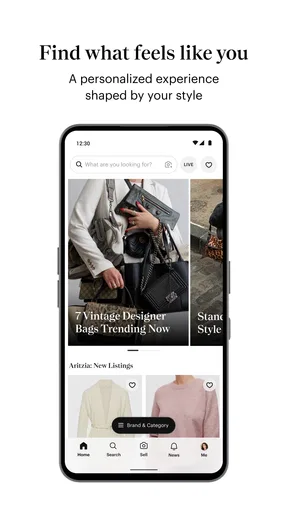
Jumping into Poshmark is pretty straightforward. You start by creating an account, which is as easy as pie. You can sign up using your email, Facebook, or Google account. Once you're in, the interface is quite intuitive. It’s a bit like Instagram meets eBay, with a clean, visually appealing design.
Browsing and Shopping
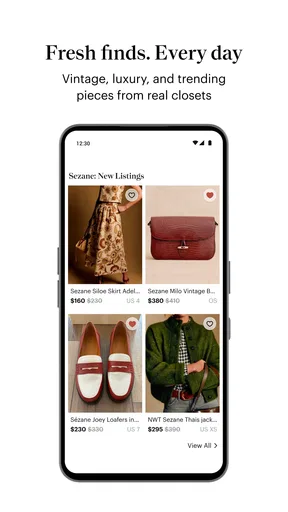
If you’re a shopaholic like me, you’ll appreciate the browsing experience. The app allows you to explore a vast collection of items ranging from clothes to accessories and even home goods. The search functionality is robust, letting you filter by size, brand, and price. There’s a thrilling sense of discovery as you scroll through the seemingly endless options.
The app is designed to make shopping easy and fun. You can "like" items to save them for later or share them with friends. When you’re ready to purchase, the checkout process is seamless, with various payment options available. Plus, there’s a sense of community thanks to the ability to follow other sellers and share comments.
Selling: Your Closet, Your Store
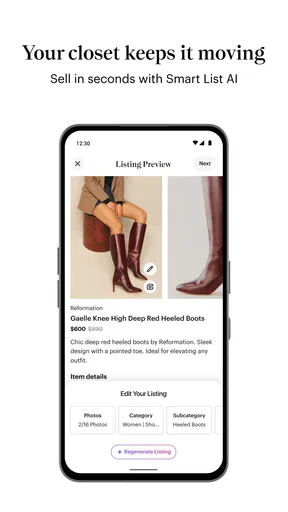
Turning your closet into cash is one of the app's biggest draws. Listing items is a breeze. Just snap a few photos, add a description, and set your price. The app provides shipping labels, which is a nifty feature that simplifies the process. It’s like having a mini boutique at your fingertips.
What I love about selling on Poshmark is the control you have. You can adjust prices, offer discounts, and engage with potential buyers. It’s a great way to declutter while making some extra money. However, keep in mind that Poshmark does take a commission on sales, so factor that into your pricing strategy.
The Social Element
One of the unique aspects of Poshmark is its social features. You’re not just buying and selling; you’re participating in a community. You can join "Posh Parties," which are virtual shopping events centered around themes or brands. It’s a fun way to connect with other fashion enthusiasts and discover new items.
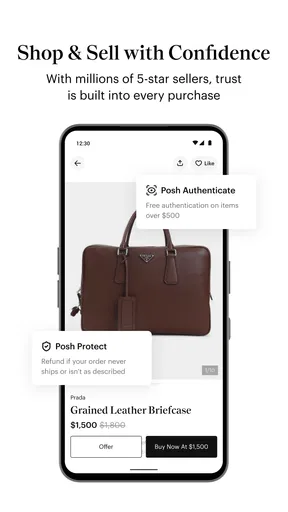
There's also a sense of security with the app's buyer protection policy, which ensures that transactions are safe and secure. It gives both buyers and sellers peace of mind, which is always a plus.
Who gets the most out of this marketplace?
I would recommend this shopping app most to people who enjoy secondhand fashion, have a specific label or size in mind, or are willing to browse listings from different sellers to find a good match. It is also a natural fit if you already have clothes or accessories in usable condition and want to try selling them without setting up a separate storefront. The visual format makes it easier to compare style and presentation than a text-first classifieds page.
It is less compelling if you need a particular item immediately, want the predictability of buying new from one retailer, or dislike checking details across individual listings. A marketplace can offer variety, but the exact item, condition, and seller experience vary. If certainty and speed matter more than discovery, a conventional retailer may suit you better.
A realistic buying and selling routine
Imagine I am looking for a jacket in a particular size. I filter the results, open a few promising listings, and compare the photos and descriptions instead of choosing the first attractive price. I save the strongest candidates, then come back when I can give the decision proper attention. That small pause is useful: it helps me notice differences in condition and decide whether a listing is worth asking about.
On the selling side, I would start with one item rather than photographing an entire wardrobe at once. I would show the garment clearly, describe its condition in plain language, and set a price with the commission in mind. If interest is slow, the ability to adjust the price gives me a way to reconsider without rebuilding the listing. I would still treat selling as a small task that needs follow-through, not instant money.
How it compares with familiar shopping options
Compared with a standard online store, Poshmark is less uniform: listings come from sellers, so browsing feels more like searching through individual closets than choosing from a single retailer’s stock. That variety can make the hunt rewarding, especially when I want a particular style or a lower-cost alternative. The trade-off is that I need to pay closer attention to each listing’s photos and description.
Compared with general classified marketplaces, its clothing focus and social browsing give it a more fashion-oriented feel. Following sellers and joining themed Posh Parties can make discovery more engaging, though those features are not a substitute for checking whether an item suits me. I would choose a conventional resale listing site for a broad mix of unrelated goods, but this app makes more sense when apparel and accessories are the main reason I am browsing.
Small choices that improve the experience
For buyers, I find it helpful to decide on size, budget, and acceptable condition before opening a long run of results. Those boundaries make the filters more useful and reduce the temptation to save dozens of items without a real plan. When comparing two similar listings, I focus on what the seller actually shows and describes rather than assuming that a familiar brand name guarantees a particular condition.
For sellers, photographs and descriptions do much of the work. A clear image and specific wording help a potential buyer understand what is being offered; vague descriptions can create uncertainty even when the price looks attractive. I would also think about the likely net amount after commission before setting a price, so a sale feels worthwhile rather than disappointing once the transaction is complete.
What to expect from selling and buying
A common question is whether listing an item automatically means it will sell. I would not approach it that way: making a listing is only the first step, and buyers still need to find it, like it, or decide to purchase. Price, presentation, and the appeal of the item all affect how attractive it looks. The app gives me tools to manage a listing, but it cannot make demand predictable.
Another practical question is whether the experience is only for clothing. The shopping and selling experience also includes accessories and home goods, so someone looking beyond apparel can still browse. Even so, the app’s strongest identity is fashion resale; I would not use it as my first stop for every household purchase.
Everyday limits and sensible expectations
The community side can be enjoyable, but it asks for more attention than a simple one-off checkout. Browsing, following sellers, commenting, and joining themed events all add ways to discover items, yet a person who only wants to search once and leave may find those layers unnecessary. I use them selectively, keeping the focus on the item rather than treating activity in the community as a requirement.
I also keep the marketplace trade-off in mind: a listing is not the same as a standardized product page from a retailer. Buyers should read carefully, and sellers should make their own descriptions clear. The buyer protection policy is reassuring, but I still think the best first defense is a considered purchase and an honest listing.
Who should skip it, and when to return
If I were shopping for a time-sensitive replacement, I would probably choose a store with predictable stock and delivery rather than depend on finding the right individual listing. Likewise, anyone who dislikes secondhand shopping, negotiating around price, or comparing seller details may be happier with a conventional retailer. Poshmark rewards patience and curiosity more than urgency.
For a casual browse, saving a few promising items and returning later is a sensible way to avoid impulse purchases. For selling, starting with a single well-presented item lets me learn the process before committing more of my closet. Those approaches keep the app useful without turning it into a daily chore.
What the app is and the final call
Poshmark is a free shopping app from Poshmark, Inc, with an average rating of 4.5 from around 192,000 ratings and more than 45,000 written reviews. It has been available since November 11, 2013, and its current version is 9.48 for devices running Android 7.0 or later. The app is rated for Everyone and has over 10 million installs, which gives a sense of how established its marketplace is.
My verdict is that it is worth trying if you like browsing fashion resale or want a manageable way to list items from your closet. The strongest parts are the visual discovery, useful filters, saved likes, and the chance to buy and sell in one place. The compromises are real: connection matters, listings need individual scrutiny, and selling takes care and patience. I would recommend it to a friend who enjoys the hunt, but not to someone who wants every purchase to be instant and uniform.
Final Thoughts
All in all, Poshmark - Sell & Shop Online is a fantastic app for anyone looking to buy or sell fashion items. It’s user-friendly, engaging, and offers a little something for everyone. Whether you’re hunting for a bargain or aiming to clear out your wardrobe, Poshmark makes the process enjoyable and rewarding. So why not dive in and see what treasures you can find?
Pros
- Wide variety of fashion items available.
- User-friendly interface for easy navigation.
- Secure payment options for peace of mind.
- Social features enhance shopping experience.
- Frequent promotions and discounts.
Cons
- High seller fees can reduce profits.
- Shipping costs may be high for buyers.
- Limited customization of search filters.
- Some users report slow customer support.
- Occasional issues with item authenticity.
FAQs for Poshmark: Shop & Sell Fashion
What is Poshmark and how does it work?
Poshmark is a social commerce marketplace where users can buy and sell new or gently used clothing, shoes, and accessories. To get started, simply create an account, list items for sale by uploading photos and descriptions, and browse the app to purchase items from other users. Transactions are facilitated within the app, ensuring secure payments.
Is Poshmark safe to use for buying and selling?
Yes, Poshmark is generally considered safe due to its built-in payment protection and secure transaction process. The app holds payments until the buyer confirms receipt and satisfaction with the purchase. Additionally, Poshmark offers customer support to resolve disputes, providing peace of mind for both buyers and sellers.
What fees does Poshmark charge for transactions?
Poshmark charges a fee for each sale made. For sales under $15, the fee is a flat rate of $2.95. For sales $15 and over, Poshmark takes a 20% commission. This fee structure is important to consider when pricing your items to ensure you receive your desired profit.
Can I return items purchased on Poshmark?
Poshmark has a "No Return" policy for most purchases, emphasizing buyer responsibility to review items carefully before purchase. However, returns are allowed if the item received is not as described. In such cases, buyers can open a case through Poshmark's support to resolve the issue.
How does shipping work on Poshmark?
Shipping on Poshmark is straightforward. Sellers receive a prepaid, pre-addressed shipping label once an item is sold. They must ship the item within seven days to ensure timely delivery. Buyers pay a flat shipping rate, which is added at checkout, making it convenient and transparent for both parties.


